Hello! We are saddened to hear about the closure of CubedHost, a long-standing reputable host in this space.
As such, we have seen an increased amount of clients transferring over to PiglinHost from CubedHost.
To make things as smooth as possible, we ask all clients transferring to do the following:
1. Please ensure you have your files from CubedHost. They have details on how to do this on their website - https://cubedhost.com/
2. Upload your CubedHost files (As a .zip file ideally) to Google Drive (Or a file-sharing site of your choice).
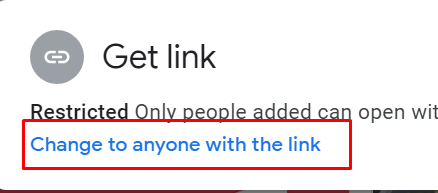
3. Once uploaded, right-click on the folder and then click Share. Once here, ensure to click 'Change to anyone with this link' - then copy the sharable link generated.
4. Please create a Support Ticket with the link to your files that you copied from Step 3 here: https://billing.piglinhost.com/submitticket.php?step=2&deptid=5
Alternatively, you can message 'PiglinHost Support' in our Discord Server with the same information with the addition of your email address. You can join our Discord here - https://discord.gg/ZRUF59W9KR
To make the process smoother, please include the following in the message:
Server Version: (Example Forge 1.12.2 or Paper 1.17.1)
Main World: (Example 'world')
5. Submit the ticket. Our team will have this transferred for you as quickly as possible depending on the size of the files.
If you are unsure or stuck, please reach out - our Support team are more than happy to help!